
Plan the input, review, and export stages that turn image generation into a usable commerce workflow.
The starting point
An image generator produces a candidate. Publishing that candidate requires a wider process: a reliable source, a clear purpose, a product review, and an export that works in the intended channel. Treating those stages as one workflow makes it easier to understand both the opportunities and the limits of generated fashion imagery.
Start with one existing garment rather than an entire collection. Choose a product you can inspect directly and define the image's job. A campaign illustration, a styling idea, and a product listing require different levels of evidence and different approval decisions.
Prepare a source that answers questions
Use clear references with visible edges and important construction details. Include more than one angle when the desired result would reveal areas missing from the main photograph. Keep accurate written product information nearby: color name, material, closures, distinctive details, and the item identifier.
Do not ask an unclear source to prove something it does not show. If a sleeve obscures a pocket, capture another reference. If you only have the front, avoid approving an invented back view as product evidence. Better input is often a more useful first intervention than a longer prompt.
Set the purpose before the style
Write a short brief covering subject, framing, background, light, and intended placement. Add the details that must remain unchanged. Then identify what the workflow is permitted to vary. A different wall color may be acceptable; a different fastening is not.
Keep early attempts simple enough to evaluate. A neutral standing pose and an uncluttered scene can reveal whether the garment is preserved. Once a useful baseline exists, explore more expressive variations within the same review standard. Save the brief and references with the results.
Build an approval gate
Compare each promising result with the product references. Inspect the whole silhouette and close details. Check color, proportions, trims, seams, and the relationship between body and fabric. When a feature is uncertain, escalate it to someone who can inspect the physical item rather than assuming the generated view is authoritative.
For a hypothetical wrap dress, the review might focus on the direction of the overlap, the tie position, sleeve shape, and hem length. A visually appealing image that reverses the wrap is rejected. That decision protects the product representation while leaving room to try another composition.

Prepare the approved image for its destination
Export for the actual placement and test the result there. A homepage crop may remove useful information from a product-card crop. A large file may look excellent locally but need additional delivery work on the website. Ask the web team to verify image dimensions, responsive behavior, compression, and loading in context.
- Match the file to the correct product and color variant.
- Keep the approved original separate from channel exports.
- Write alternative text that describes the image's relevant content.
- Confirm applicable channel rules and usage rights before publication.
- Retain enough production notes to reproduce or revise the asset.
After publication, collect feedback about what the image does and does not answer. Customer questions are useful input for the next brief. A working generation process is not defined by the number of pictures it can produce; it is defined by how reliably the team can turn appropriate candidates into accurate, useful assets.
Consider the page around the image
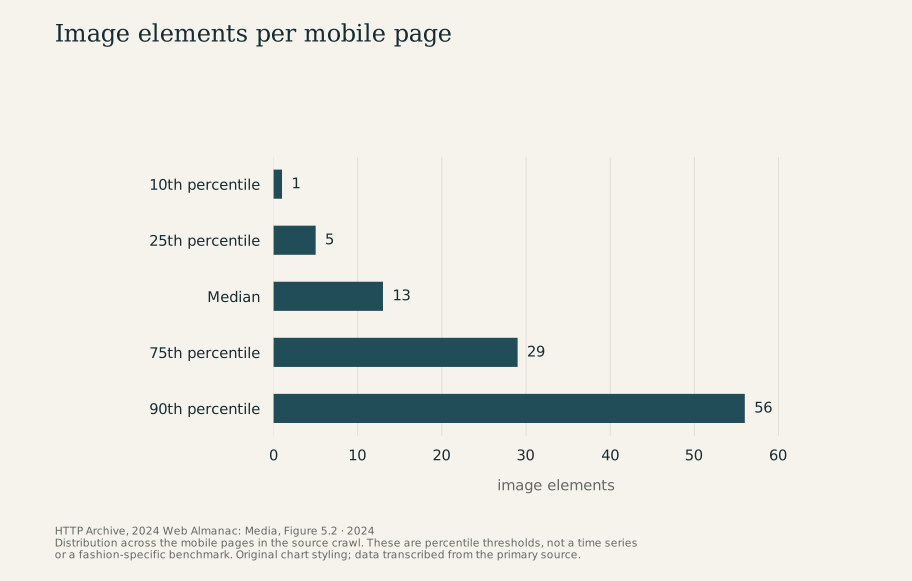
In HTTP Archive's 2024 mobile crawl, the median page contained 13 image elements; the 90th-percentile threshold was 56. Those observations span many kinds of website. For an image-generation project, they provide context for discussing the finished page with the web team, rather than a target number of product photographs. Read the original Media chapter, Figure 5.2.
Research & sources
These findings describe the named studies and companies. They provide context, rather than measuring Atellia or establishing the effect of the advice above. Source dates are separate from retrospective theme years.
Image elements per mobile page
2024 · image elements
View chart data
| Measure | image elements |
|---|---|
| 10th percentile | 1 |
| 25th percentile | 5 |
| Median | 13 |
| 75th percentile | 29 |
| 90th percentile | 56 |
Study scope and numerical references
- Median count of image elements per mobile page: 13 image elements. Pages in the Web Almanac mobile crawl; all websites in the sample, not a fashion-store benchmark. HTTP Archive, 2024 Web Almanac: Media, 2024
- 90th-percentile count of image elements per mobile page: 56 image elements. Pages in the Web Almanac mobile crawl; a percentile, not an average. HTTP Archive, 2024 Web Almanac: Media, 2024